

How to set up text blocks on your donation page
Setting up your streamer page in Donatty: writing the text of the welcome block
With Donatty you can personalise your donation page, including adding text blocks to the welcome page.
How to add text blocks
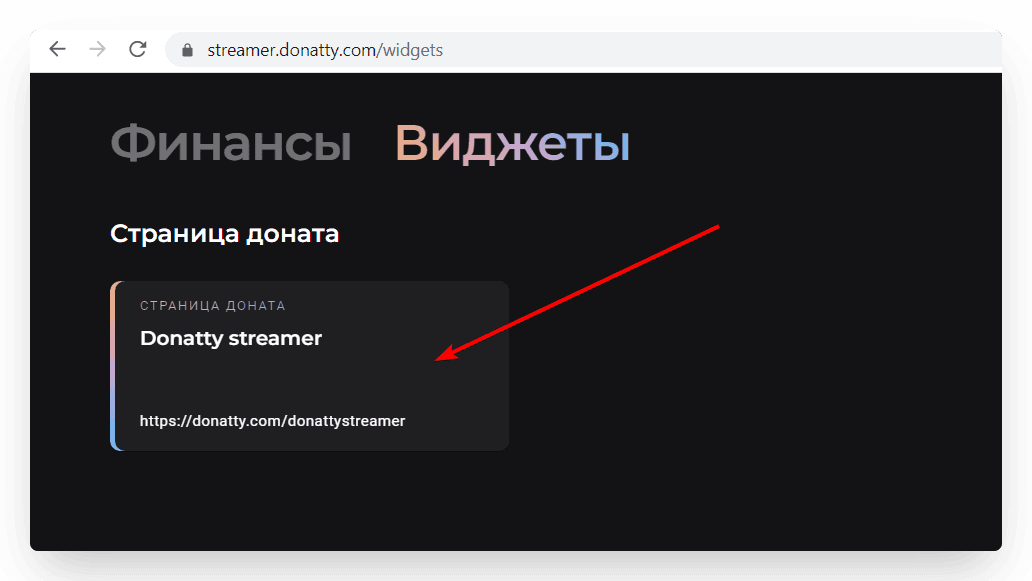
Find the Donation page card in the Widgets section. Click it to start editing.
To add text blocks, click the toggle next to the block you want in the Welcome page section.
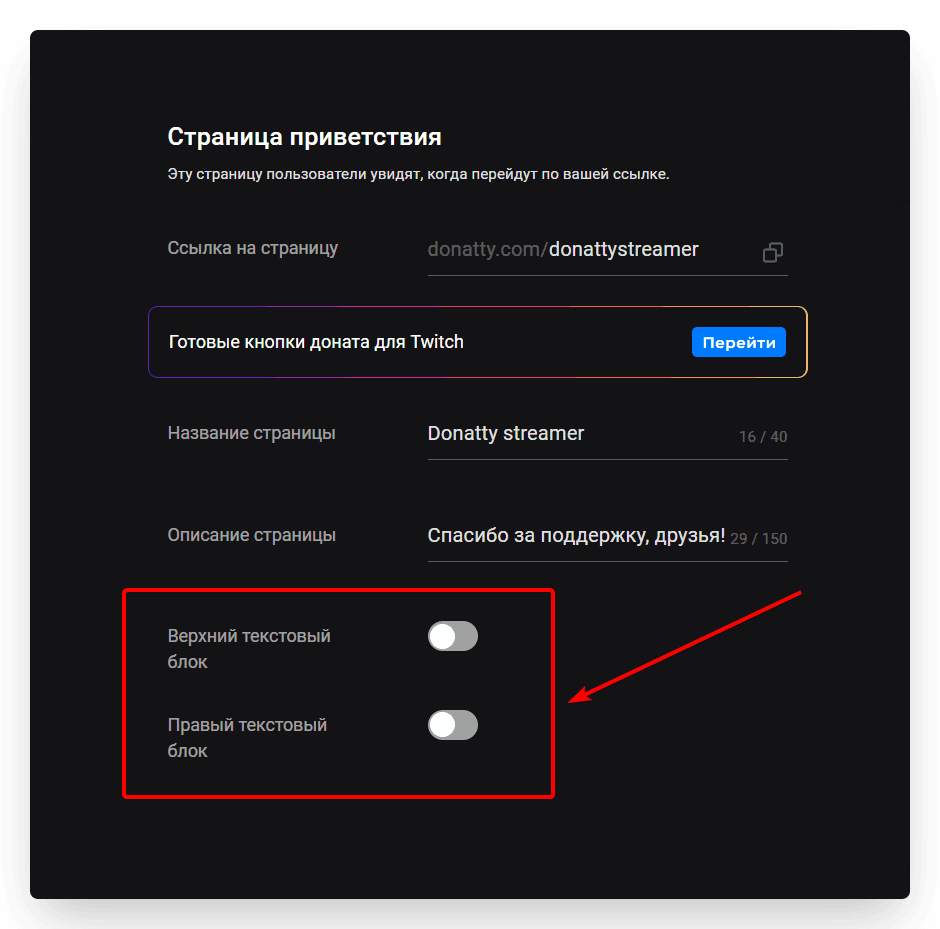
Two text blocks are available:
the top text block;
the right text block.
Setting the block text
Clicking the toggle makes the block's text settings available. You can write any text in this field using Markdown syntax, and even insert links. You can check how the text will look right away on the screen to the right, or by clicking Open in browser after saving your settings.
Writing the text
Markdown is a text markup language that formats your text into headings, lists, bold type and so on. It is simple enough that anyone can pick it up in 10–15 minutes. Markdown text is formatted using special characters placed before or after words or phrases. Here are the main text settings available through Markdown in Donatty:
Headings
To create a heading, put a hash (#) before a word or phrase. The number of hashes matches the heading level. Donatty currently supports two heading levels. For example, to create a first-level heading (h1) use one hash (#), and two for the second level (h2). Remember to put a space between the hashes and the heading text.
# First-level heading h1 · ## Second-level heading h2

Lists
Numbered lists are created by listing items and putting a number and a full stop in front of them. The numbers do not have to be in order, but the list must start with the number one (1).
1. first · 7. second · 4. third

For a bulleted list you can use any of three characters: a plus (+), a minus (-) or an asterisk (*).
+ first - first * first · + second - second * second · + third - third * third

Bold, italic, monospace and strikethrough text
To make text bold, add two asterisks or two underscores before and after a word or phrase.
**bold text** · __bold text__

To italicise text, add one asterisk (*) or underscore (_) before and after a word or phrase.
*italic text* · _italic text_

Use three characters for bold and italic at the same time.
***bold and italic text*** · ___bold and italic text___

Monospace text is text in which every character has the same width. To get that effect, use backticks (`).
`monospace text`

If you need to format a whole block of text this way, put three backticks on a line before and after the text.
``` · first line of text · second line of text · ```

You can strike text through by adding two tildes (~) before and after it.
~~strikethrough text~~

Horizontal rule
If your layout needs a horizontal line, you can draw one with three asterisks or three underscores.
*** · ___

Links
You can also put links to web pages in a text block, using square and round brackets. The square brackets hold the label and the round brackets the link itself.
[link_label](the_link)
If you want a link with a tooltip, put the tooltip in quotation marks (“).
[link_label](the_link/ "tooltip")
](https://framerusercontent.com/images/HftdUFJaSR9BcLTKGqf5yQYGs.png)
Which Markdown features Donatty does not support
At the moment you cannot:
insert tables;
quote your favourite author;
use markup to create paragraphs and line breaks. The Enter key on your keyboard will do that job.
Write beautiful text that your followers will enjoy reading, and earn more with Donatty!
Setting up your streamer page in Donatty: avatar, cover, URL and more
Using ready-made Twitch panels from Donatty to brand your channel
