

How to filter profanity and bad words in donation messages
Turning on profanity filters and setting up a blocklist
Barely a day goes by without news of another streamer being banned on Twitch. The reason for such a ban is a breach of the platform's rules. Those rules prohibit any content that promotes or encourages discrimination, harassment or violence based on race, ethnicity or gender, sexual orientation, age, religion or nationality. YouTube likewise prohibits publishing content containing demeaning statements or calls to violence against individuals or groups based on their race, ethnic origin, religion, disability, gender, age, veteran status, caste or sexual orientation. To avoid trouble with a platform it is important to know and follow the rules: watch your language and explain to your viewers which phrases must not be used on stream.
Turning on the filters
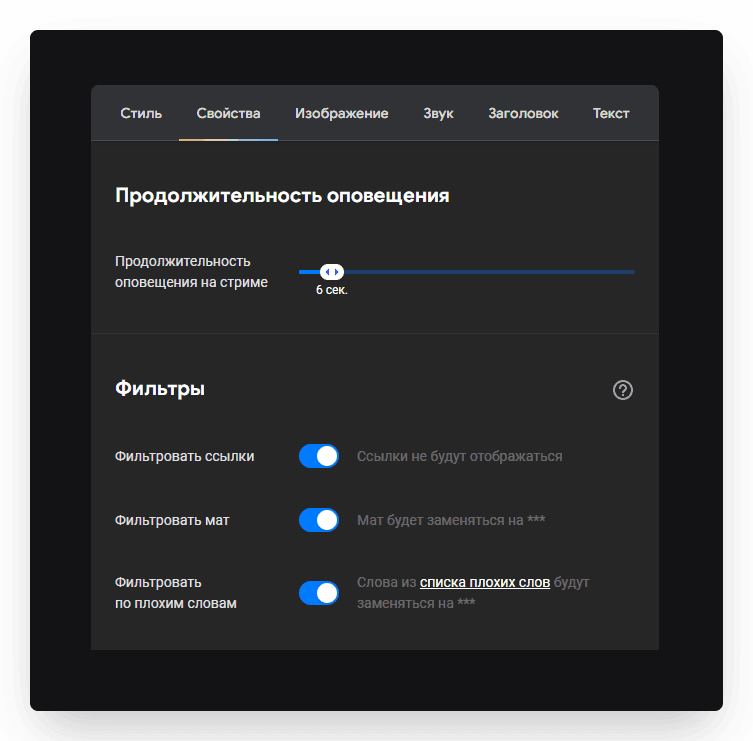
To protect yourself and your channel from what ill-meaning donors write, the alert and Top widget settings let you configure profanity and bad-word filters. To do that, open the widget settings, go to the Properties tab and, in the Filters block, switch on the toggles in the Filter profanity and Filter by bad words rows.
Setting up the bad-word list and the replacement word
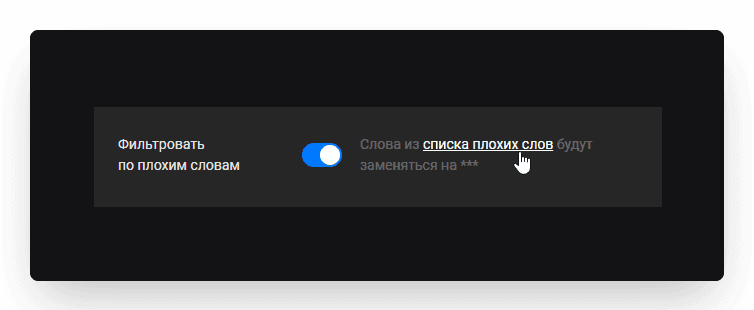
Let's set up the bad-word list. Click the link to do that.
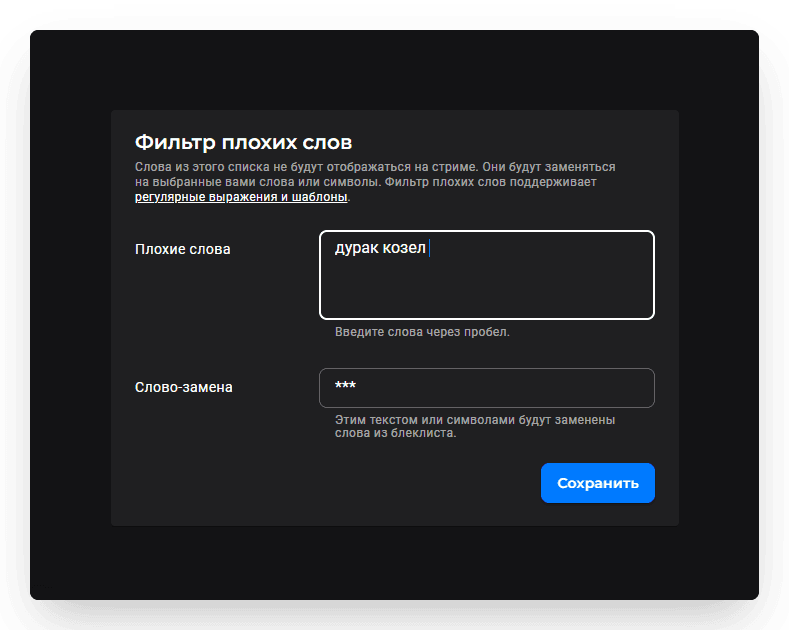
In the Bad words field, list the words you do not want to see on your stream. Separate them with spaces. In the Replacement word field, enter the word that will replace anything from the blocklist. It can be a single character rather than a word.
What the bad-word filter supports
The bad-word filter supports:
plain words;
patterns;
regular expressions.
Plain words
For example, put the word fool in the Bad words field, and a hash # in the Replacement word field. The replacement then works like this:
Bad words: fool · Replacement word: # · Donor's message: You're acting like a fool · Message shown on stream: You're acting like a #
Patterns
In the Bad words field, write particular characters that define a search rule. The system finds matches for the pattern you wrote and replaces them with the word from the Replacement word field. If you write some letters or words after wc:, the system will look for those standalone letters or words in the donor's message:
Bad words: wc:so wc:fool · Replacement word: # · Donor's message: So you're acting the fool again, right · Message shown on stream: # you're acting the # again, right
If you want the system to replace every word starting or ending with a particular letter, use an asterisk (*).
Bad words: wc:f* · Replacement word: # · Donor's message: Fine, you fool · Message shown on stream: # you # · · Bad words: wc:*l · Replacement word: # · Donor's message: Well you fool · Message shown on stream: # you #
To have the system replace every word containing a particular letter, build the pattern like this:
Bad words: wc:*o* · Replacement word: # · Donor's message: So you're acting the fool again, cool · Message shown on stream: # # acting the # again, #
If you put the asterisk between letters in a search pattern, the system looks for words made up only of those letters, or words that start and end with them. For example:
Bad words: wc:f*l · Replacement word: # · Donor's message: Fine you fool · Message shown on stream: # you #
Important: when using patterns, bear in mind that for a pattern a “word” is the run of letters and characters between two spaces. If, in the previous example, the donor puts a comma after “Fine”, then as far as the pattern is concerned that is a word starting with F and ending with a comma. The system will not find it to replace:
Bad words: wc:f*l · Replacement word: # · Donor's message: Fine, you fool · Message shown on stream: Fine, you #
An underscore (_) in a pattern stands for a number of characters. If you want to find and replace words starting with a particular letter and followed by a specific number of characters, use underscores.
Bad words: wc:f_ · wc:f___ (3 underscores) · Replacement word: # · Donor's message: Fine you fool · Message shown on stream: # you #
To find and replace words ending with a particular letter and made up of two or four letters, build this pattern:
Bad words: wc:_l · wc:___l (3 underscores) · Replacement word: # · Donor's message: Ah you fool · Message shown on stream: # you #
To replace a five-letter word whose third letter is a particular one, the pattern looks like this:
Bad words: wc:__o__ (2 underscores on each side of the letter) · Replacement word: # · Donor's message: You're acting like a moron · Message shown on stream: You're acting like a #
If you want every four-character word starting and ending with particular letters to be replaced, build this pattern in the Bad words field:
Bad words: wc:f__l (2 underscores between the letters) · Replacement word: # · Donor's message: Fool oh you fool · Message shown on stream: # oh you #
If you use square brackets ([ ]) in the Bad words field, the pattern matches any one of the letters inside the brackets.
Bad words: wc:f[oa]ol · Replacement word: # · Donor's message: A faol is a fool either way · Message shown on stream: A # is a # either way · · Bad words: wc:[fc][oa][ao]l · Replacement word: # · Donor's message: Cool fool · Message shown on stream: # #
A dash inside the brackets lets you give a range of letters:
Bad words: wc:f[a-z]ol · Replacement word: # · Donor's message: A faol is a fool either way · Message shown on stream: A # is a # either way
In the examples above we used special characters such as the asterisk, the underscore and square brackets. Sometimes you need to find and replace words that contain those very characters. For that, use a backslash (\) — it strips the special characters of their “superpower”.
Bad words: wc:\*fool\* · Replacement word: # · Donor's message: You're acting like a *fool* · Message shown on stream: You're acting like a #
Regular expressions
Regular expressions are a mechanism for finding and replacing text. They are based on a special notation for search patterns, starting with regex: As with patterns, regular expressions use particular characters. A full stop (.) matches any single character. Let's build a pattern where the system looks for every four-letter word starting with F and ending with L:
Bad words: regex:f..l · Replacement word: # · Donor's message: Well you fowl fool · Message shown on stream: Well you # #
If you need to find and replace a full stop in the donor's text, use a backslash (\).
Bad words: regex:\. · Replacement word: # · Donor's message: Well you fowl fool. · Message shown on stream: Well you fowl fool #
To find and replace a word written out with spaces between the letters, use (\s*) where the spaces are.
Bad words: regex:f\s*o\s*o\s*l · Replacement word: # · Donor's message: Well you fowl f o o l · Message shown on stream: Well you fowl #
If you use square brackets ([]) in a regular expression in the Bad words field, it matches any one of the letters inside the brackets.
Bad words: regex:f[oa]ol · Replacement word: # · Donor's message: A faol is a fool either way · Message shown on stream: A # is a # either way
A dash (as with patterns) lets you give a range of letters. If we write [a-z] in a regular expression, the system looks for words with any Latin letter from a to z in that position.
Bad words: regex:f[a-z]ol · Replacement word: # · Donor's message: A faol is a fool either way. · Message shown on stream: A # is a # either way
If you want to exclude a letter from the search, use the caret (^). It matches any single character that is not in the brackets. For example, [^ab] matches any character except a or b. The construction [^a-c] matches any character except a, b and c.
Bad words: regex:f[^ae]ol · Replacement word: # · Donor's message: A faol is a fool either way. · Message shown on stream: A faol is a # either way · · · Bad words: regex:f[^a-e]ol · Replacement word: # · Donor's message: A faol is a fool either way. · Message shown on stream: A faol is a # either way
Square brackets ([]) let you list alternatives for a single character. If you want to list whole words, a vertical bar (|) is the better choice.
Bad words: regex:cool|fool · Replacement word: # · Donor's message: A cool fool, honestly. · Message shown on stream: A # #, honestly
To find and replace a specific word at the start or the end of a phrase, use the caret (^) and the dollar sign ($). ^ marks the start of the text (line) and $ the end of it.
Bad words: regex:^fool · Replacement word: # · Donor's message: Fool is not so foolish! · Message shown on stream: # is not so foolish · · Bad words: regex:fool$ · Replacement word: # · Donor's message: You are not such a fool · Message shown on stream: You are not such a #
Regular expressions can use the asterisk (*) too. Put it after an expression and the system finds zero or more repetitions of it. For example, put an asterisk after a range of Latin letters. Such a regular expression will find and replace every word written in the Latin alphabet — including the donor's nickname, if it is written in Latin characters.
Bad words: regex:[a-z]* · Replacement word: # · Donor's message: I picked up 99 coins on that level yesterday · Message shown on stream: # # # ## # # # # #
The asterisk also helps find and replace words sharing a stem:
Bad words: regex:fool[a-z]* · Replacement word: # · Donor's message: You fool you foolish you foolery · Message shown on stream: You # you # you #
To replace digits, use \d. This combination matches a single character that is a digit.
Bad words: regex:\d · Replacement word: # · Donor's message: I scored 99 points on that level yesterday · Message shown on stream: I scored ## points on that level yesterday
Curly braces ({ }) specify the number of repetitions. Say you want to find and replace only three-digit numbers:
Bad words: regex:\d{3} · Replacement word: # · Donor's message: I scored 99 and 108 points on that level yesterday · Message shown on stream: I scored 99 and # points on that level yesterday
And for two- and three-digit numbers:
Bad words: regex:\d{2,3} · Replacement word: # · Donor's message: I scored 99 and 108 points on that level yesterday · Message shown on stream: I scored # and # points on that level yesterday
To find and replace every space, use \s. This character stands for a space.
Bad words: regex:\s · Replacement word: # · Donor's message: A cool fool, honestly. · Message shown on stream: A#cool#fool,#honestly.
We have covered only the most basic examples of using patterns and regular expressions to build a bad-word list. Once you know what the special characters mean, you can build a huge variety of patterns for finding and replacing text. Use the profanity filter and the bad-word filter to avoid awkward moments on your stream caused by unwanted words in donations.
Setting up a donation alert on stream: amount conditions, custom text and GIFs, adding it to OBS
Setting up donation alerts with amount conditions
